Vega on OPACs - remove cookies?

We run our Vega Discover page on our OPACs inside of Public Web Browser (PWB) kiosk software. We have it timing out and resetting after a couple minutes, so folks don’t leave their Vega page logged in for the next user.

However, every time the browser resets, the cookies message reappears, and patrons think they cannot use the ILS because it grays out the whole page.

We are using Chrome with, as mentioned, PWB on top of it. PWB only controls the timing of the browser, not its internal settings for particular pages. In Chrome Settings I tried to allow all cookies for wdmpl.na5.iiivega.com and catalog.wdmlibrary.org but it made no difference - the cookies popup still appears and grays out the page.

It looks like the cookies are further controlled by other settings in Vega? This comes up if you click “Manage cookie preferences” when that gray bar pops up:
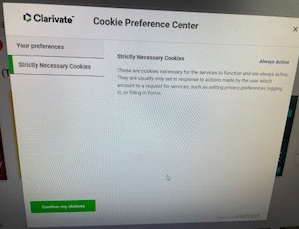
If we Confirm the choice for Strictly Necessary Cookies, it doesn’t make any difference. No other options are given. The cookies message comes back.

I tried searching in the Supportal under Vega Discover for options, but didn’t see any.

For other libraries using OPAC stations of any kind - how do you manage this? **Can this be turned off any other way? **

Thank you!

Hi Traci,
There is a very popular Idea Lab idea on this topic here: https://ideas.iii.com/forums/951766-vega-discover/suggestions/48434300-disable-vega-discover-cookie-prompt-for-kiosk-site

Additionally, in the road map there seems to be a way to opt out of cookies (but I am unclear if you can opt out of kiosks and not the main sites ): https://portal.productboard.com/iii/15-vega-product-portal/c/911-opt-out-of-onetrust-cookie-banner
There is no release date associated with this topic.

We have exactly the same problem - staff report that the public think the station is out of order because of the “gray” page…

Thanks,
Elizabeth


From: Traci Glass via Innovative Users Group webguru@innovativeusers.org
Sent: Tuesday, January 20, 2026 8:18 AM
To: Elizabeth Wright ewright@virl.bc.ca
Subject: [IUG Forums] [Polaris] Vega on OPACs - remove cookies?


Traci Glass
January 20

We run our Vega Discover page on our OPACs inside of Public Web Browser (PWB) kiosk software. We have it timing out and resetting after a couple minutes, so folks don’t leave their Vega page logged in for the next user.

However, every time the browser resets, the cookies message reappears, and patrons think they cannot use the ILS because it grays out the whole page.

We are using Chrome with, as mentioned, PWB on top of it. PWB only controls the timing of the browser, not its internal settings for particular pages. In Chrome Settings I tried to allow all cookies for wdmpl.na5.iiivega.com and catalog.wdmlibrary.org but it made no difference - the cookies popup still appears and grays out the page.

It looks like the cookies are further controlled by other settings in Vega? This comes up if you click “Manage cookie preferences” when that gray bar pops up:

image

If we Confirm the choice for Strictly Necessary Cookies, it doesn’t make any difference. No other options are given. The cookies message comes back.

I tried searching in the Supportal under Vega Discover for options, but didn’t see any.

For other libraries using OPAC stations of any kind - how do you manage this? **Can this be turned off any other way? **

Thank you!


Visit Topic or reply to this email to respond.

You are receiving this because you enabled mailing list mode.

Unsubscribe from these emails.

Hi Traci,

If you have Vega Discover Premium with custom menu headers,

you can input the following code (preferably near the top) and it should remove any cookie pop-up and grey screen that appears when you open the page.

<style>
div#onetrust-consent-sdk {
    display: none;
}
</style>

If you aren’t on a version with custom menu headers, feel free to contact me directly and I have a couple theories that might work.

For anyone who runs into this, using this will make you GDPR non-compliant. There is a way to turn off the gray screen only. This version is GDPR compliant, because the cookie notice is left intact. Let me know if you’d like this instead.

1 Like