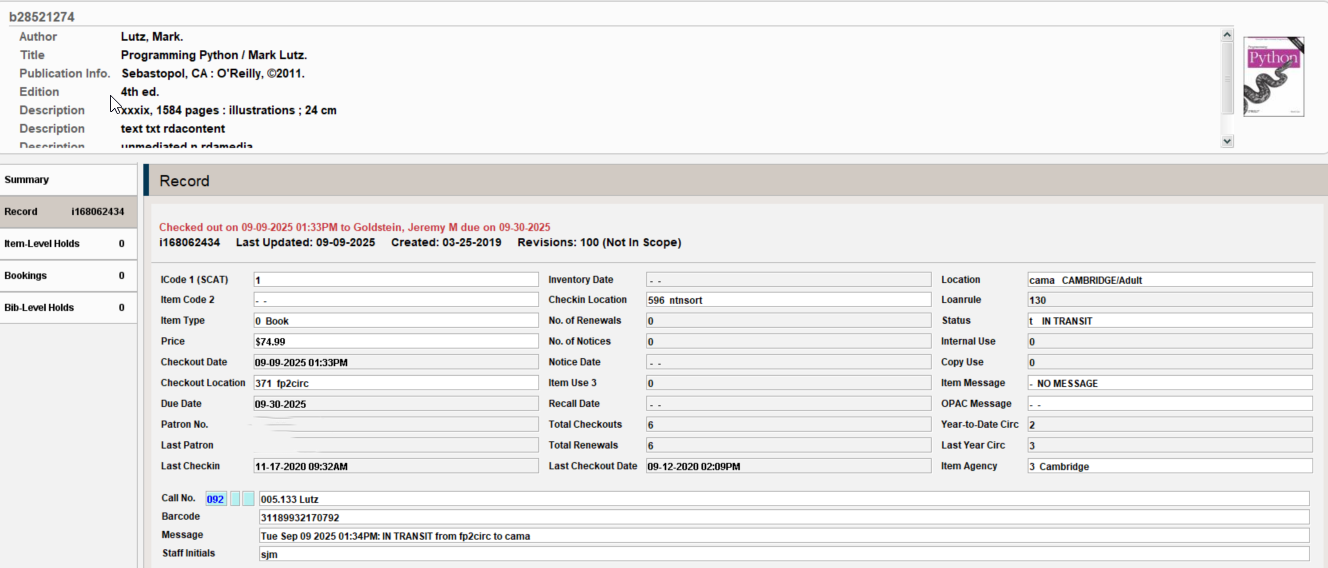
This Python Script identifies the subset of items that were not checked in as expected, due to a patron record being left open in another session.
The identifiable items are cases in which an item appears to be simultaneously checked out and in transit to a different location. In these instances, the transit information appears to be correct and the item should be removed from the patron record.
The script will check in the item again using the Sierra API, which clears the discrepancy, and logs the item information for future reference.
The script requires an API Key with the Items Write role and SierraDNA/SQL access. The script also makes use of the sierra-ils-utils Python library developed by @rayvoelker
Very cool, @jmgold Jeremy, but I got a little lost in the stat group section. I’m very pleased to see the API checkins specifying the stat group, but I think I would benefit from seeing a sample “IN TRANSIT” message and its corresponding stat group code and name from statistic_group_myuser to fully grasp this. I suspect your large Minuteman consortium has its stat groups set up quite differently than our system does. Thanks in advance!
I’m certainly happy to elaborate Bob, I’ve been truly entrenched in this whole thing so honestly thank you for the opportunity to provide an info dump about it all, you asked for it
Below you can see an example of one of these problem cases I was able to generate from testing through the following steps:
Place a hold on an title belonging to a different library (cam)
Check it in at the requested pickup location (fp2), placing it on the holdshelf
Check it out to the patron (using statgroup 371, designating the fp2 circ desk), being sure to not close out of the patron record
Using a different Sierra session (with the same 371 stat group in this case) check it in using checkin (no patron)
Back in the session used to check out the book, close the patron record
Essentially this makes it so the checkin in step 4 just doesn’t happen at all, BUT the item status and message are still triggered as if it had, producing here the Message “Tue Sep 09 2025 01:34PM IN TRANSIT from fp2circ to cama”
As for our statgroup schema, we aim to have the first two digits of the number map to a building location (37 = fp2) leaving the third digit to map to a mostly standardized service point (0 = self check, 1 = circ desk, 2 = childrends, etc.). But as things like pickup lockers and sorters have been introduced we’ve had to fudge that a bit.
Thanks, I understand your design now, Jeremy. What threw me is that your stat group names are short codes, where ours are verbose like “Lake Selfcheck” or “Smith’s Waco Market”, the latter being a Bookmobile stop.
Ah okay. Yeah they weren’t planned out for this particular purpose but having the short, fairly uniform codes sure made it easier to be able to extract the locations from the message field.
For those without your specific stat group naming scheme, your fp2circ in the Item Message field is a Sierra login iii_user.name, right? So it looks as though a JOIN to iii_user would yield the iii_user.statistic_group_code_num to substitute for the data source of the checkin_stat_group_code (third column of SQL query) to get the stat group code needed for the API checkin call. Am I oversimplifying or missing anything here, @jmgold?
Yes that is the username and not the stat group name, ours just happen to match most, though not all of the time so I am correcting that now precisely per your logic.