Hi,
After running some security updates on our server, it appears that concurrently our auto-renew has stopped working. Has anyone experienced issues with auto-renew behaving like this even when the loan table is correct and unaltered?
Thanks, Sam
Hi,
After running some security updates on our server, it appears that concurrently our auto-renew has stopped working. Has anyone experienced issues with auto-renew behaving like this even when the loan table is correct and unaltered?
Thanks, Sam
Are your courtesy notices running? That is the trigger for the auto renewals to occur.
Just want to update this: the problem was in the xcirc process, which is used for external circulation, was disabled somehow. Why? iii wasn’t able to deduce, but they recreated xcirc and it brought the notices back online, and API was triggered accordingly.
Best, Sam
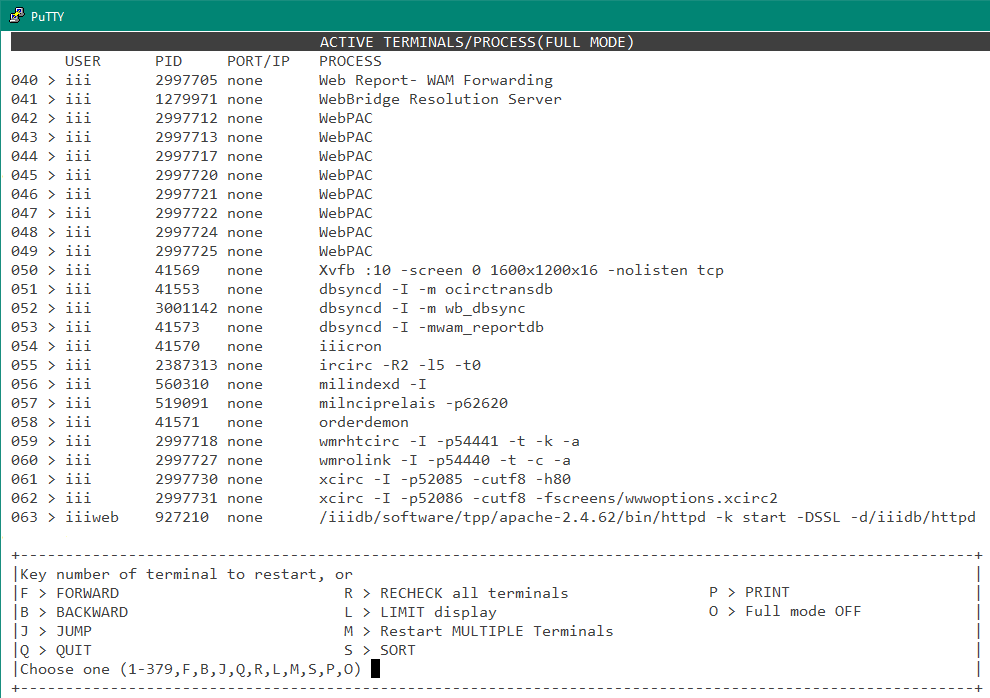
@sdavidson, if this sort of thing becomes a recurring problem – it has for my library in the past – you can develop a sense of the background processes which should be running by regularly viewing them in Admin Corner:
Two xcirc processes are visible in the screenshot above on lines 061-062.
Everyone’s Admin Corner menus seem to be different in some way, but my menu path to this display is ADDITIONAL System Functions → RESTART a Terminal → Show ALL. Rather than paging through hundreds of processes, I recommend using the PRINT function and viewing that output in a good text editor.
Thank you for this! I’ve never gone this deep!
Sam
So, when you have run into this problem, have you simply restarted xcric from the admin app?
No, management of system processes are the responsibility of Innovative Support. Even if you are self-hosted and have the ability to ssh into your Sierra app and DB servers with root privileges, I recommend that you treat everything in the /iiidb filesystem as being read-only. A very interesting read-only, but leave it at that. For all I know attempting to reconfigure or run anything in there may violate an agreement with Innovative (and I’m not about to read fine print to find out).
It’s also worth pointing out that the menu label is misleading and “Restart a terminal” when applied to an SDA process really means “kill”. I regularly go on murderous rampages after hours to clean up any still-running SDA processes, be they attached to an unattended PC or a zombie process since disconnected from its tty (display device). These do not spontaneously regenerate, but I have noticed that self-checkout stations and other SIP devices will typically restart when killed in this way. My point being, don’t assume that restarting the parent process of xcirc will restart xcirc or anything else. One notable exception is the “Restart the HTTP server” Admin Corner menu option (not everyone has it), which does exactly what it says.
We used to have on-premises turnkey servers which were managed by Innovative, and during this period it was common for dataservice to fail to run upon reboot, which means the app server and database server could not communicate. Kind of a problem. We later entered a period of self-hosting and that was very educational to peer under the hood of Sierra, but we had an occasional problem with sendmail not running after a reboot. Eventually we became a hosted customer and the periodic sendmail problem resumed, only to be replaced by its successor postfix not always running following a reboot. These mailer processes mark the point when I started to pay closer attention to the process table. Although we did have a problem with xcirc, that was only once, maybe twice and certainly not enough for a pattern to develop.
A degree of familiarity with the system processes can help you steer Support in the right direction. For a while during the sendmail/postfix problem period, I would make a point to check for the mailer process anytime Autonotices failed to be emailed out; I was able to tell Support that not only that notices were not sent, but why. When Support tells you they had to restart “some process which does xyz”, consider asking them for the actual name of the process.
May you never find yourself in such a pattern of recurring problems to actually benefit from this advice, Sam.