When using Leap, if we register a patron without adding an email address, we get this message when we save. I do understand that, in the setup, reminder notices can be sent by email regardless of patron preference. Is this just a memo reminding me I don’t have an email for this patron, or do I have something set up in Admin that I only want reminders sent via email and not by patron preference? Also, where would I look? I’m not the Admin, but I am trying to help our Director figure out this message that we’ve received for years. We’d like to know why we get this and whether anything should be set differently in the setup.
Hello!
I’ll first note that I’m using Polaris 7.7 because reminder notices vary slightly depending on your version.
Reminder notices only go out via email or text message (if you have text messaging set up and configured). That warning appears if you have any reminder-type notice enabled in your settings (7.7 has four reminder notices available for use) and you then save a patron record without an email address and without a phone number + a mobile carrier (if you have text messaging enabled). The warning is basically an alert that this customer will not get those reminder notices.
To see what reminder notices your organization is using and how they are set up, an administrator should go to the Administration Explorer tree view, select Parameters for the organization in question (this can be at the System level, Library level, or Branch level), and click the Notification tab in the details view.
Then double-click Notification Options. The Reminder tab will show you the various types of those messages that are enabled on your system, whether you are sending additional text messages, and how the messages work on your system.
You can find detailed information about this area of the system in the Patron Services Administration Guide for your version of Polaris here: https://documentation.iii.com/polaris/. I hope this helps.
Lynn
3 Likes
We have the default eReceipt Option set to “Email Address”. While we do not require an email address to create an account, our staff will see the following notice if no email address exists. This is expected behavior on our end and helps remind staff to encourage and ask patrons for an email address.
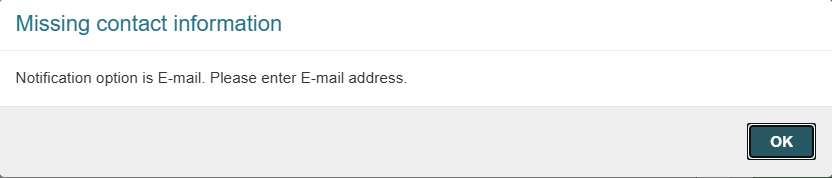
Similarly, if the default eReceipt Option is set to “TXT Messaging”, staff would see the following.
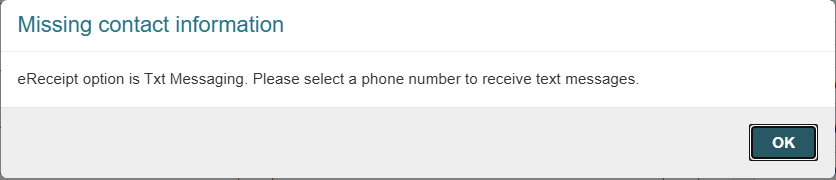
See Polaris Staff Client Help - Setting Up eReceipts for more details.
1 Like
7.8 here and all of this is still the case!
Just adding that you will get the “please enter E-mail address” error (and will not be able to proceed in saving the patron registration) only if the notification method and/or receipt option is set to Email. Same goes for the “Phone number” error if the notification method and/or receipt option is set to Text.
If the notification method is set to anything else, like Mailing address, you will get the gentler “Do you want to continue” message (not error), which is, as you guessed, a hint regarding reminder notices only going out via email. You will still be able to proceed and save the record after clicking through that message. To the best of my knowledge, like Lynn mentioned there is no way to turn this message off/to not display if you have SA settings turned on for reminder notifications. You could propose an option to turn this message off in Idea Exchange though!
2 Likes
All these replies point to having a notification tied to email and thus having to enter one. However, reminder notice isn’t configurable anywhere I have found yet. If I set everything to no notifications, or text notifications only. We are still prompted with the ‘Reminder Notices’ warning.
I’ve gotten a few questions from staff about this message, specifically the Reminder warning. They’re just thrown off because they think it’s an error message that requires them to enter an email address, even though we don’t require email addresses for patron accounts. After reading these messages I thought the most reasonable thing to do is just change the message text to read more clearly to staff and hopped into Web Admin. I found what I think is the correct string, but it’s only in the Polaris Application Services, not the Staff Client product where I’m used to modifying Leap specific strings… I went ahead and tried making the change on our Training Server, just to see if it would work, but I have yet to see the new text surface… I wonder if maybe there’s a job or something that needs to run/restart for Polaris Application Services strings to get updated? I’ll check on it again tomorrow, but if anyone has previous experience with those strings, I’d appreciate some insight… For anyone interested, here’s what I’m testing:
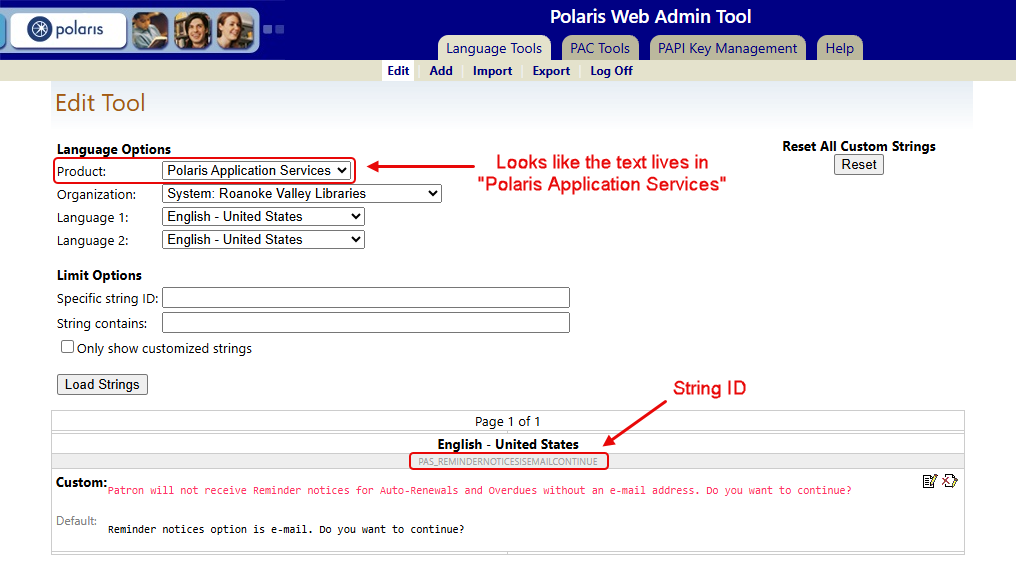
Logged back in this morning and, sure enough, the custom language string is showing up now!
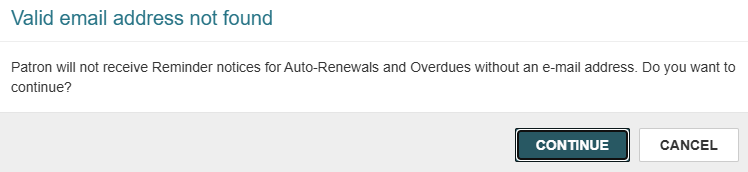
So, while I can appreciate the fact that people might want to disable this notification (it is a little annoying…) at least there are options to make messaging a little clearer for staff. If you want to change your own, here’s a list of the related String IDs:
Reminder Notices (no e-mail):
Default: Reminder notices option is e-mail. Do you want to continue?
PAS_REMINDERNOTICESISEMAILCONTINUE
Missing Contact Information (e-mail notifications):
Default: Notification option is E-mail. Please enter E-mail address.
PAS_NOTIFICATIONEMAILADDRESSMISSING
Missing Contact Information (text message notifications):
Default: Notification option is TXT Messaging. Please select a phone number to receive text messages.
PAS_TEXTPHONEMISSING
Missing Contact Information (e-mail eReceipts):
Default: eReceipt option is email. Please enter E-mail address.
PAS_ERECEIPTOPTIONEMAILMISSING
Missing Contact Information (text message eReceipts):
Default: eReceipt option is Txt Messaging. Please select a phone number to receive text messages.
PAS_ERECEIPTTEXTPHONEMISSING
There are, of course, other related strings but these are the ones that have already been touched on in this thread.
2 Likes
Hi @Phil, we copied this great idea and our front-line staff really like it. Thank you!
Glad it was helpful! Still would be nice if libraries could decide if they want to see this prompt or not though…
1 Like