Our consortium is at the beginning of our migration from Sierra to Polaris. Our goal is to primarily use the web-based software, but we understand that there are some functions that are only available in the client. For simplicity’s sake we would like to keep the number of staff who need access to the client to a minimum. I have looked through the documentation but haven’t been able to discover which functionality can only be found in the client software.
This depends on which version of Polaris you will migrate to. I suggest looking at the Idea Exchange, limiting to Polaris ideas, and using a ctrl+F search to look for the term client. That may give you a better idea of what current Polaris users report not being able to replicate in Leap.
You should absolutely have everyone give Leap a try… 90%+ of what they need is there and is probably easier to use.
But depending on your catalogers, the most likely place you’ll still need the desktop client will be for those who need to do heavy editing or lots of cutting and pasting of MARC data. This is because Leap lacks a freeform MARC editor. It has ways to do minor edits and compare records side-by-side, but many would like a freeform editor that it just currently lacks.
This aligns with my experience as a cataloger. There are some things that I need to use the desktop client for that are more complex, but about 90% of the tasks I need to complete can be done in Leap. Some of the updates announced for 8.1 and 8.2 will bring that closer to 95%. Authorities and very specific Serials functions are the holdouts.
For libraries that are migrating to Polaris, it would be more helpful to do everything in Leap and then ask this group (or the Discord) for help as you encounter hurdles.
As a library group that just had our “Go Live” at the end of February, I’ll echo the sentiment that you should start everyone (even catalogers) in Leap and only explore the Client functionality with individuals if you discover specific pain points (like the free-form cataloging mentioned by @wesochuck ). I expect you’re probably going to be hosted, which means any staff trying to access the Client would be doing so via a remote desktop app… which just isn’t an amazing experience… I gets the job done, but it’s prone to latency delays and occasional disconnects, especially if the session idles. At present, I’m pretty much the only member of our staff that looks at any of the remote desktop applications, and that’s almost exclusively for SQL access and the local user directory for staff account. The times I have genuinely needed to use the Desktop Client have been few and far between.
I’ll also point out that the Desktop Client looks… dated… I know that’s a little petty, but I find that staff are often influenced by the way a product looks, especially after a migration. It will probably be easier for you to get buy in with your regular staff if you simply never show/mention the Desktop Client.
As for catalogers specifically, all of ours are using the Connexion Client to create their MARC files, exporting them to a file, and uploading them directly to Leap. If your catalogers are comfortable using that, MARCEdit, or some other external application, I don’t see much reason to use the Desktop Client for cataloging either. However, that’s still going to be largely depend on your local needs/workflow.
There is some TCP/IP config that was recently added to support direct export to Leap that I’ve been looking into as well, but I haven’t gotten that working yet. In theory, we should be able to set it up so that records can be created/edited in Record Manager or Connexion and staff could simply click the export button to have the records send directly to the Polaris server without needing to jump through any other hoops, but I’ve really only gotten so far as getting some firewall configs set up with iii support. I only mention this to say that the Polaris Desktop Client isn’t really your only option for cataloging outside of Leap.
Phil, one of our hangups with cataloging in Leap is the difficulty in bulk adding barcodes when bulk editing a record set. How has your experience been with that?
For better or worse, none of our libraries have wanted to move forward with EDI ordering, which I think is where your question stems from? All of our Items are added individually by staff in one of 4 Tech services departments, corresponding to the library group that purchased the material. Typically, no one is adding more than 8-10 copies of any one title at most, so the need to bulk add items hasn’t been a huge issue. Additionally, all of our item barcodes come from pre-printed rolls, so using system generated barcodes hasn’t been a priority either.
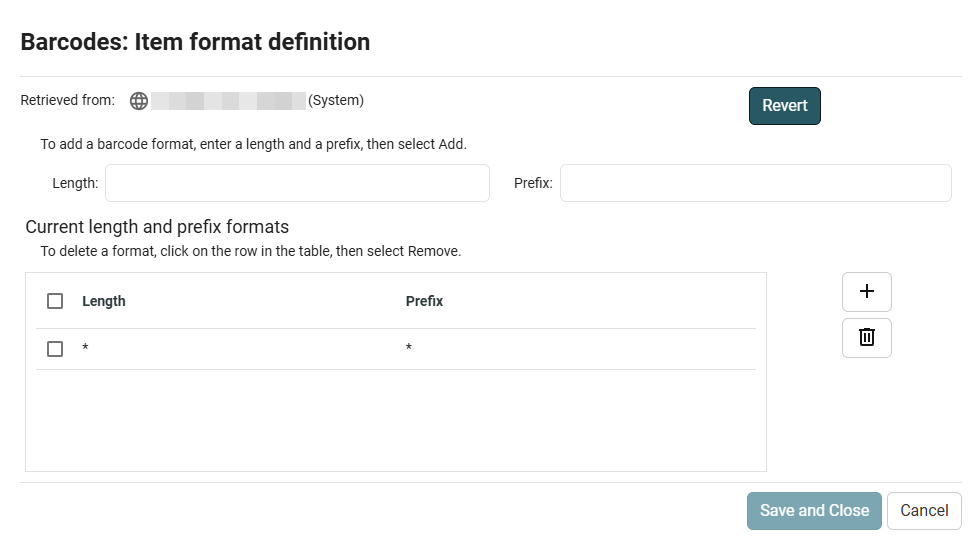
That said, what are the specific issues you’re having with your workflow now? There seems to be some functionality in place already, but I haven’t had any reason to fool with it. Most notably, there’s the Barcode Format definitions, which I think is used for system generated barcodes?
Really wish we could define RegEx patterns for barcodes, but Length + Prefix should suffice for most applications… so long as you don’t have any real dependencies on checksums…
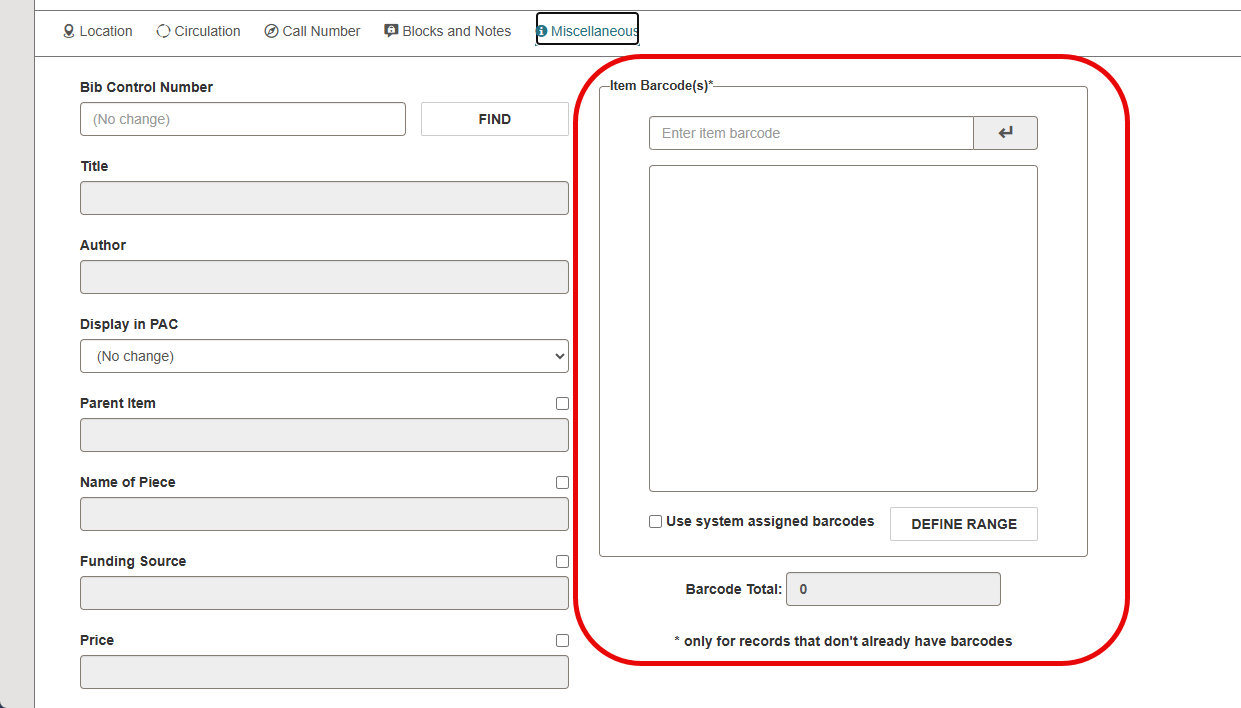
Then there’s this utility in the Item Bulk Edit tool under Miscelleneous:
It sounds like it tries to assign barcodes from the list or generated range to items without barcodes, but keeping the order straight seems… challenging… I’m not sure if the Bulk Change Processing would necessarily match what you were working with on screen, especially if you had applied any on-screen sort options or filters to help select your items…
Like I said, we haven’t done any bulk Item Barcode edits of automatic assignments, so I can’t speak directly to anything, but these are a couple of the existing options that seem interesting to me. Still, that 8.2 feature sounds more promising that what I’m looking at now.
It is the utility in the Item Bulk Edit tool under Miscelleneous.
In Polaris Client, we can scan the barcodes of the items in the record set and do a bulk update. As long as the books are in order by title, the barcodes are assigned correctly. In Leap, they seem to be assigned randomly.
Very small potatoes, but as someone who uses (or tries to use) Leap for everything, here are my pet peeves for actions that remain only possible in the Client:
Bulk deletion of record sets - Idea Exchange’s submission about this is 2 years old and still shows as “under review” so…not holding my breath it will be possible soon!
Direct links to POs and invoices from a Fund workform - you can see individual line items in Leap under the History tab of a Fund workform, but they are not clickable/linked so you have to look up the PO/invoice separately. In Idea Exchange this fix looks to be planned, at least!
Fund explorer - we use parent and sub funds, with only the sub funds being, well, funded. In the Client you can see summary totals of all sub funds when you look at a parent fund, but in Leap you can only see the individual sub fund totals. Thus if you want to use Leap to create a general report on just the parent funds, you have to add up all of the sub fund lines (encumbrances, free balances, etc.).
Like I said, these are tiny quibbles!
The cataloging updates in 8.1 were helpful but, as others pointed out, still did not bring Leap’s cataloging functionality up to the same level as the Client’s.
Gross… That sounds more like a bug to me, but I have a feeling they’re being assigned in a “less useful order” and not just a random one… like by ItemRecordID… still, this sounds like something that ought to be fixed…
I imagine the difficulty is keeping the “state” of the sort from one area to another. Not impossible, but I certainly don’t think I ever would have thought that someone had been using the tool this way.
My guess is they’ll want this as an Idea Exchange request, but I ALWAYS start out pushing for it to be treated as a bug, especially if the Desktop client did it differently.