Hi, I’m wondering for any Saas hosted libraries, if anyone has successfully been set up / configured to have direct access to your SQL Server to run queries, rather than having to remote in via Polaris remote app Resources ?
Hello! We were told a that this was not something Clarivate did anymore when we went live October 2024. (Folks who have been around might know more about the backstory on that). Not sure if anything has changed since then, it would be nice not to have to mess with remote app resources !
2 Likes
That is interesting to know that they used to allow it. We are going through a migration to Polaris , with go live in early August. They are saying the same thing… but hoping for a hack 
We just went live with Polaris in February and got a similar answer. It seems a more security minded response than anything, not that the concern is totally unfounded. That said, I’ve found the remote apps to be reasonably reliable, though there are definitely some quirks. Here are a few unsolicited tips:
-
Always allow access to your Clipboard. Even if you’re not planning on using it because you’re logging into the user administration app, the choice applies to all of the remote apps being used with that remote session.
-
Similarly, if you want to save and access files on your local machine using the remote apps, you’ll need to enable access to Drives at launch. It’s always going to start in the local directory for the remote station though, so you’ll need to remember that “Documents” doesn’t mean the “Documents” on your local workstation. But I would probably only use this feature if I needed to output a large amount of data directly from the SQL server.
-
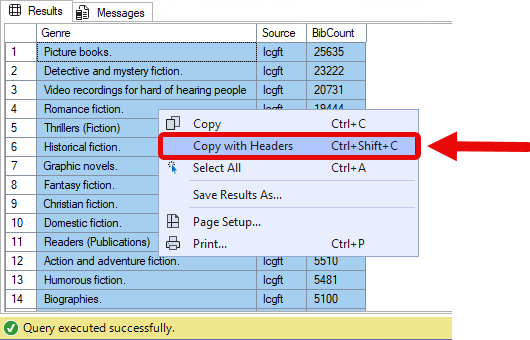
For data output, it’s generally easiest to run the query in the grid and then copy/paste the data into a workbook on your local machine (and why allowing access to the clipboard is so important). While more of a SQL Server Management Studio tip, I’ll point out that you can right-click and choose “Copy with Headers” to add the headers to your clipboard… I was manually typing in my headers in my local workbooks for months before I realized this:
-
For whatever reason, saved queries don’t seem to work if you don’t explicitly name the database in your table reference, despite working just fine before you saved and reopened the query. I’ve been making it a habit to add in the [Polaris].[Polaris]. or [PolarisTransactions].[Polaris]. to any table references before I save a query, just to make sure the queries will run the next time I open them… probably a best practice I should be adhering to anyway, but it’s annoying when you’ve got a bunch of JOINs in the same database…
-
Be patient. Especially if you’re having to log back in after the RD app closed unexpectedly. It seems like the previous instance of the app is still running on the remote station when you attempt to relaunch the remote app, so it can get a little tied up. The security acknowledgement that pops up with the SQL connection has been what I have to wait on the most… and it can be tricky to get to sometimes, even with patience… But once you do trust the connection, it seems like it applies to the older instance of the remote app that didn’t fully close. You can close the new window and go back to your work in the older one.
-
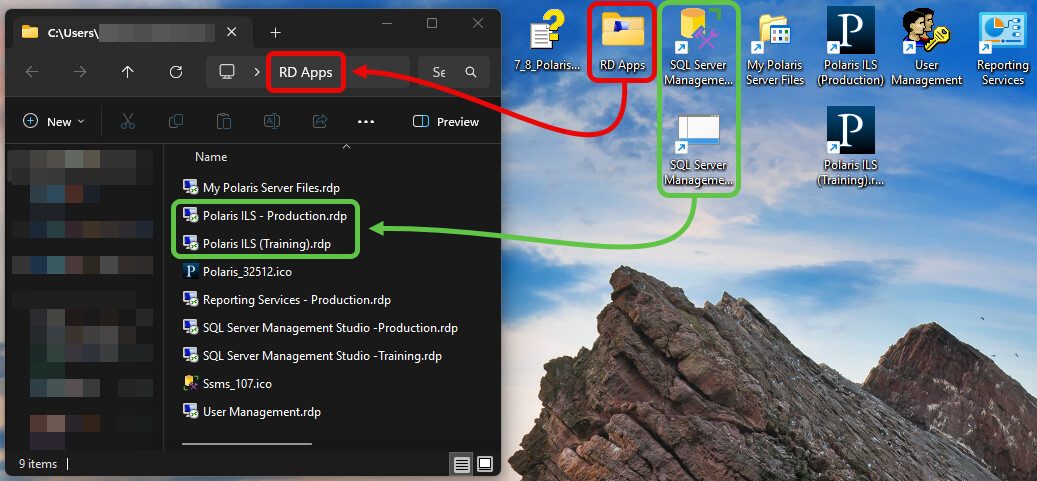
Don’t keep going back to the RD web address and launching the apps from there. You just end up downloading new copies of the .rdp files and junk up your downloads folder. Instead, I put all the .rdps in a folder on my desktop and created shortcuts for each of them. I changed the icons for the shortcuts so I could distinguish them better and store those directly on my desktop:
I agree a direct connection would be nice, but this is how I’ve tried to make the most of the remote access.
Thanks so much Phil. It’s going to be an adjustment for me and what I have been accustomed to do 
The other problem, is that working from home when I do occasionally, the Remote method doesn’t work… Maybe I’ll be able to get that part fixed.
Ah, yes… the dynamic IPs assigned to residential internet connections is definitely a hassle… I’ve only ever asked support to whitelist my home IP a couple of times, but they were accommodating. Still, I’ve more or less given up on being able to perform significant tasks from home during odd hours of the night because I can’t know when my ISP might decide to reassign my IP… It’s not a big deal for things that aren’t time sensitive, but if I’m planning to start work on a project at 12:00am, I’d prefer to be certain I’m going to be able to access the server from home… Again, support has been willing to work with me on whitelisting my home IP, but it’s a game of whack-a-mole…
2 Likes
Do you use a VPN when working remotely? That might be at the root of that problem.