I find if occasionally useful to search MARC data directly, but since there doesn’t appear to be any way to do that directly in Leap, I’ve resorted to SQL for these purposes. I imagine I’ll continue tweaking this as time goes on, but I wanted to share what I’ve got right now.
As is, you can use this to search any MARC tags you’d like for whatever term you enter into the @TagSearch variable near the start of the query. This is run through the LIKE function, so just know that’s how the matching will be executed… it’s a little expensive, so just keep that in mind as you’re selecting tags to search on.
Speaking of selecting tags, I included a bunch of common tags in the search that can be commented/uncommented as needed, but you can add any tags you want to the @TagNumber table variable. Just make sure you wrap the tag number in parentheses and include a comma separator between it and the other tags.
When the query runs, you can expect to see results like this:
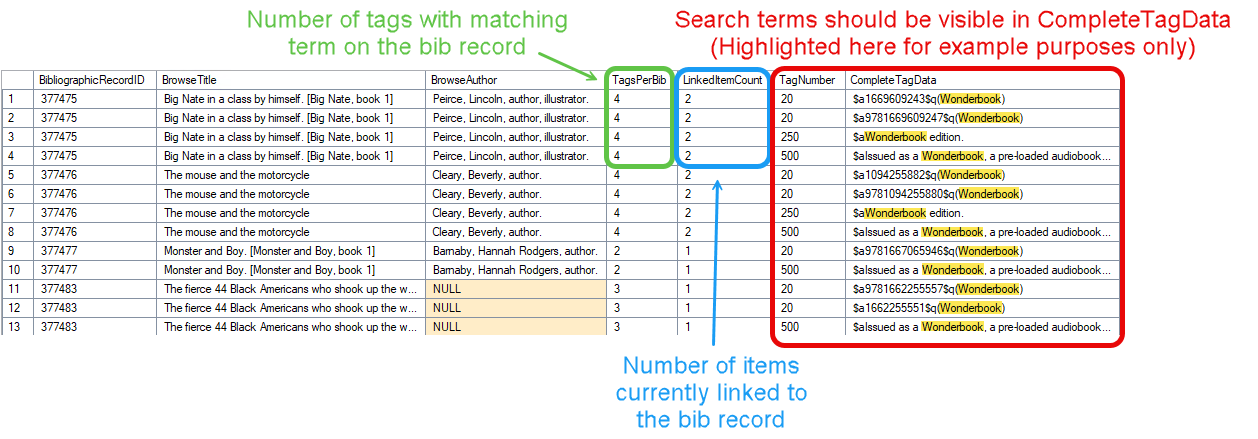
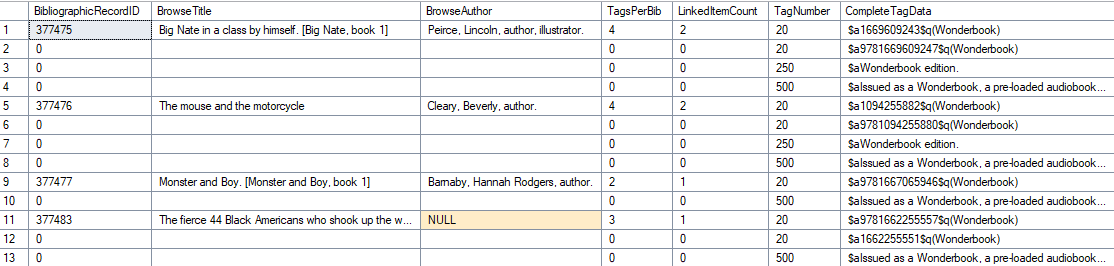
I do have a variation on the output starting on line 66 that is commented out, but can be swapped for the standard output to make is so that the bib data only appear on the first corresponding row to provide some visual cues for where each new record starts. I don’t recommend using it for any data that needs to be ported to another system, but it’s there if you want to use it natively in your SQL Studio. Here’s what that output looks like:
Now, after all that explanation, here’s the query in it’s current state, if you want to try it out for any of your own purposes:
MARC Multi-Tag Search.sql (4.3 KB)
If anyone has their own comments, questions, or input, I’d be more than happy to hear them!