First, I won’t pretend to be much of a javascript guy, but with some tinkering (and a lot of AI powered searches) I got a couple of scripts working to manipulate the item location data the displays in Vega. Since I had previously implemented a script to expand editions automatically when the title details page was loaded, I needed to integrate that into the other script, so that’s in here too. Ultimately, I ended up with two variations: One that splits and reorders item location data and another that truncates to the first pipe delimiter.
For context, the item location data includes [CALL NUMBER], [SHELF LOCATION], and [Collection/OPACMSG], unless you have included [SHELF LOCATION] in your Location Hierarchy, in which case your location data will include only [CALL NUMBER] and [Collection/OPACMSG]. These elements are concatenated into data-automation-id=“item-call-number-and-location”, which is the ultimate target for the string manipulation part of the script.
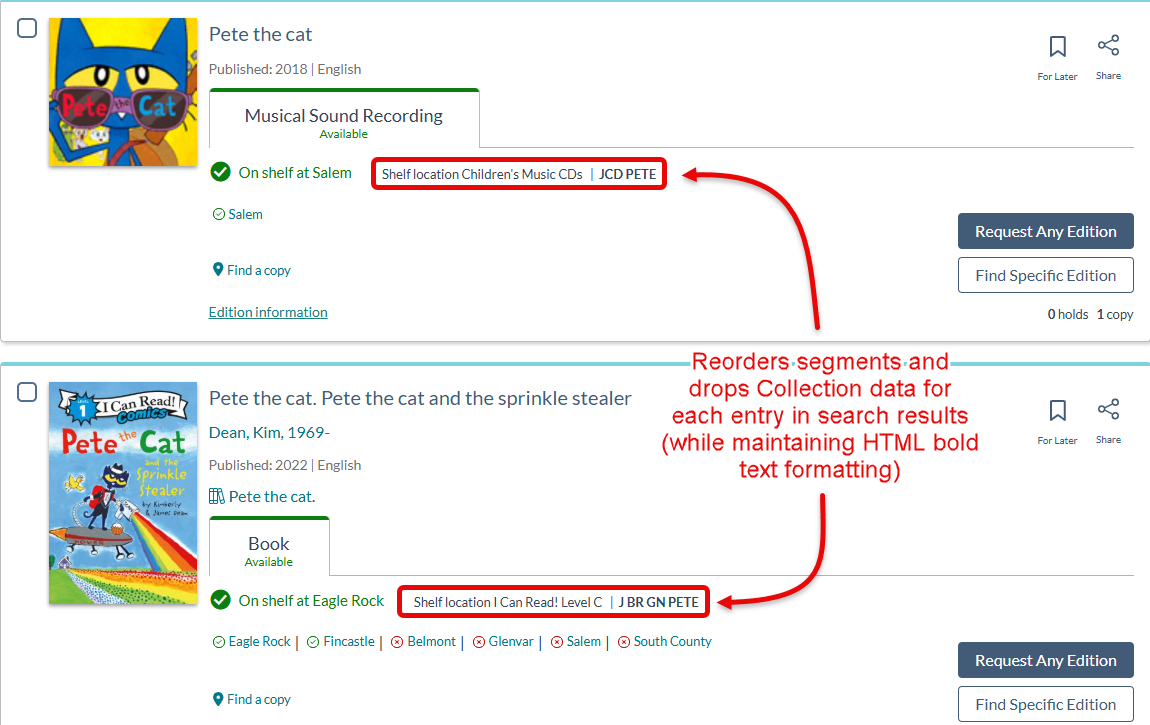
The script I deployed on our local Vega instance was the reordering variation. I didn’t like that the Shelf Location was being displayed after the Call Number and our Collections are designed in such a way that they don’t aide in physically locating items in our branches. Here’s that script:
Split & Reorder Location Data & Expand Editions.js (2.8 KB)
And here’s what our search results look like with it implemented:
As an alternative (and specifically for libraries who have Shelf Location added to their Location Hierarchy), I have a variation that truncates to the first pipe delimiter in the text string, effectively removing [Collection/OPACMSG] data from display. If that is of interest to you, here is that script:
Truncate Location Data & Expand Editions.js (1.7 KB)
Again, both scripts also include functions to expand editions automatically. Because we can’t execute separate elements from the Custom Footer, I had to integrate the two functions together. If anyone has questions (or suggestions), please let me know!
Thanks!
Phil A