When I upload marc records in Sierra there is an option to create a review file. I always create one but I don’t know how to access it. I would like to access the list of review files created and then re-order the list according to creation date. Can anyone help me with this matter?
Hi Carolyn,
You can access the files created by selecting an empty review file and choosing “Copy”. This will bring up a list of all of your regular review files, system generated review files and the ones created by importing below them. Unfortunately, I don’t think you can sort or see time stamps or anything. You can delete them here or you can choose one to copy to the review file so you can preview what is in it before deciding whether or not to empty it.
I just cleaned out our file yesterday and removed all the old ones that staff forgot to delete so my list only shows the system generated lists at the bottom:
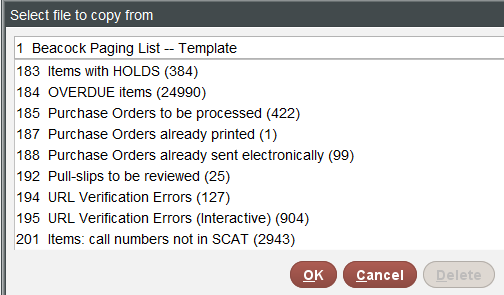
Hope that helps.
1 Like
@SarahK, did you use the bulk delete feature of system-generated review files introduced in Sierra 6.4? If so, what were your impressions of the new feature?
@cmendoza, do you have the ability to run SQL queries at your library? If so, the bool_info table can be queried to provide the display you’re looking for, just not in the SDA.
Hi Bob,
Yes. It works great! You can select 1 or many and it won’t let you access the Delete button if you are on a list that cannot be deleted (ie. A system generated file like OVERDUE items or one of your ‘real’ Review Files that you can access directly in Create Lists.
I was afraid that might be the only approach, but Thanks.
That is a part of the catalog accessed by a different department. I will reach out to them. Thanks.
@cmendoza, I’m a big fat liar! It turns out that bool_info does not include those system-generated review files.
So sorry about this. Perhaps I should seek employment as the White House Press Secretary.
Thanks for trying. I located the load files, but we have over 1,000. We put in a ticket to have some of those removed so that it will be easier to locate the ones we need.