We are a Polaris Library that just acquired Vega Discover. We also have subscriptions to WSJ and NYT. The way that access has been controlled to both sites has historically been workable but clunky, because they require us to limit access to our patrons but don’t support any of the usual authentication methods, instead just giving us a URL to provide ‘only to our patrons.’ How we handle this with the Polaris PAC is that the URL is only displayed when a patron is logged in (it’s an item in that left-hand menu AKA “portal custom content”) and not displayed on the ‘external’ site.
Discover does not seem to have functionality to display anything additional other than a patron’s own account information to them when they are logged in. I’d be grateful to hear how anyone else dealt with this.
We posed this question to our III implementation team, but they weren’t familiar with the subscription setup and didn’t seem to understand the question.
Sorry, we don’t have Vega, so my “helpful” information here is limited…
But, we had something similar to this as well for the same resources. Basically, it was a link that would only show up once you logged in. We ended up moving to a centralized authentication system that people log into with their barcode for other databases and this is just one of the databases that’s in that tool.
I’m guessing that this would need to be some sort of enhancement request to provide a custom menu or custom area that was only available once people had logged in.
I do wonder if there might be some sort of string on the patron’s “dashboard” that you might be able to manipulate with a translation string to add in something like this? I’m not sure, but do the translation strings support HTML codes?
If you are still at Irving, it looks like you might be using EzProxy for other services, so one option might be to just put it behind EzProxy like your other services.
We have Vega and use ESources through Polaris. It creates at target url that you can display anywhere. In Polaris you can then set it to require a login for verification. Only issue is it would require patron to be routed to a login screen from PowerPac. Once the patron logs in though it will take them directly to the resource if they meet the requirements you set in Polaris.
This feature can be found under Profiles > PowerPac > Categorization of ESource targets.
Same here in Phoenix… I do encourage you to poke Innovative about the status of ESource features in Vega… a group of current ESource customers met with Innovative like last year and they have said nothing since.
Thanks so much to all of you! I think we’ll look into both paths, folding them into our existing EZProxy setup for online databases and using the esource function within Polaris, since it looks like we’ll still be relying on the Polaris PAC for quite some time for other features anyway.
Eric, do you have a go-to enhancement request in Idea Exchange for this? I found a very minimalist one from 2023 that looks like it was maybe brought over from the old Idea Lab forum: Add eSources to Vega – Innovate with us . Is that the best once to vote/comment on?
I reached out to Angela today and asked for an update on this project. The group last met in February 2025 and as mentioned, there has been no updates since. I will be sure to share what I learn. The idea you linked is the idea that inspired the meeting. I recall that on one of the MEEP votes, this idea landed on the list and Innovative marked it as “too large to point” or something like that. If you want a quick tour of our eSource setup, just reach out directly. It looks more complicated that it really is..
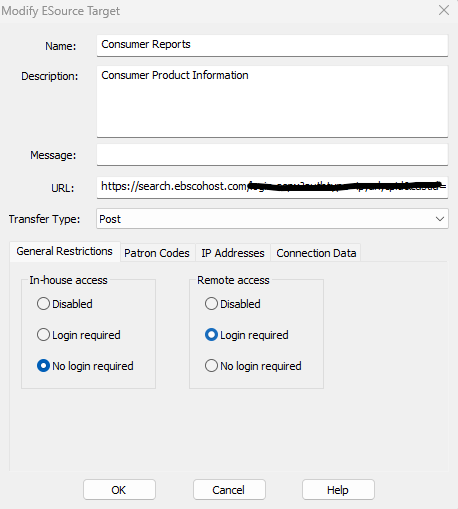
@kleblanc and @eyoung , I’d be grateful for any details you can share about your eSource setup. I’ve been poking at it this morning and haven’t had much luck so far. I’ve turned it on and set up a few test versions of NYT as targets but have not had any luck. I can get it to prompt for login, but page it links out to does not include the access code to actually gain access. I am guessing I need to enter something in the Connection Data tab in the eSource setup dialog box, but I haven’t been able to figure out what that should be.
@eolmstead So I dont have Wall Street Journal. Did you try changing the transfer type? Sometimes it is just a matter of figuring out if it should be a Get or Post.
It feels like you might have figured out most of this but if you want to look through our process you can find that below.
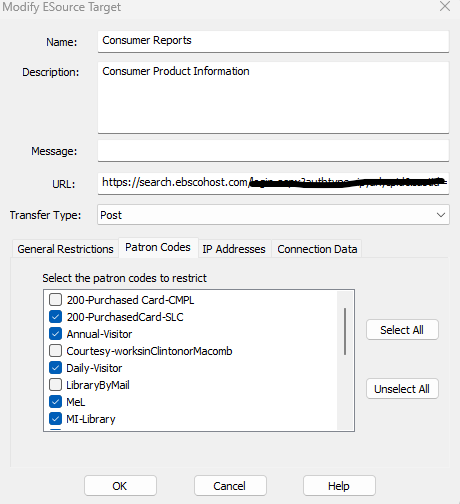
Under Administration Explorer you go to System. It does look like something you can also set up at the library level but don’t know for sure as we run everything at System. You are looking for Categorization of ESource targets under PowerPac. From there you want to add a target. Input Resource name, URL, and transfer type. (if one type of transfer doesnt work I try again with the other and it usually works) Then at the bottom is where you set certain restrictions. Do you want the resource available in-house without login, remote access options. There is a tab for patron codes. This is where you can set what patron codes you want to have access. We don’t tend to use IP Addresses or Connection Data. I’m assuming the IP would restrict to a building if that is what you are trying to accomplish. Connection data is rare to use as most 3rd parties give a unique url that is suited just to your library’s access. If it was running where it then applies credentials then it would go in that tab. We have had vedors that we needed to have them whitelist us so they know where the traffic is coming from.
Once that is set up there is a page on your PowerPac that displays all of your E-Sources, from there you will grab the target url. You can see what ours looks like here: https://classiccat.cmpl.org/polaris/search/misc/esources.aspx. We then take the target and put it in other places like e-newsletters, website etc. to promote the resources. You will find that once you have the base url there is just one part that changes and it is the # assigned to the e-resource. Now every time the patron clicks on that url it keeps track on clicks on the server as a transaction. I believe there might be a Polaris report for this but I tend to pull the stats directly from the server each month with the following SQL:
Select tds.TransactionString as [E-Source], Count(Th.TransactionID) From PolarisTransactions.polaris.TransactionHeaders th (nolock) join PolarisTransactions.polaris.TransactionDetails td (nolock) on th.TransactionID = td.TransactionID join PolarisTransactions.polaris.TransactionDetailStrings tds (nolock) on td.numValue = tds.TransactionStringID Where th.TransactionTypeID = ‘2201’
and td.TransactionSubTypeID = ‘241’
and TH.TranClientDate Between ‘2025-09-01 00:00:000’ and ‘2025-09-30 23:59:000’
How do you link out to it from Discover? Do you use a header link to the e-sources page or do you catalog the resource in your ILS so that it shows up in search results, and link out from the bib record?
We don’t catalog them but have a page dedicated to our research databases on our website. https://cmpl.org/services_specialties/advanced_research.php We find most of our patrons tend to start at our website instead of the catalog. We have thought about cataloging them over the years but never get around to it. If you wanted it to show up in catalog you could put it in as a bib and put the url in the 856 field. Another option to get it out there to your patrons is you could put the resource’s target url on the Discover homepage as a hero if you wanted to feature it somewhere within Discover. The page I referenced above is just used for me to grab the target url and never put it out there for public consumption since we dont want to maintain the PowerPac appearance. I know Discover is developing a more interactive customer profile page so hopefully that means down the road we would be able to put it somewhere more obvious to our patrons after they log in.
Just to clarify what I meant by how we use the target url. For the consumer report example this the the target url produced by that page mentioned above. https://classiccat.cmpl.org/POLARIS/Search/misc/esources.aspx?ctx=1.1033.0.0.6&Target=246. We grab that url and put it anywhere we want to promote it. It is tied only to that one database. Now that I know that base url whenever we add a new database I find the number associated with it and it is just a matter of changing out the 246.
Thanks again, Katie, this is really helpful. New York Times only worked with a “Get” method, not a “Post” method, but I’m having trouble getting the details worked out still.
Weirdly, getting set up with EZProxy as @wesochuck suggested was really easy. We are hosted with them, so we just had to ask for the database stanza and starter URL to be added. We’ll probably go with that method for now, since we don’t have NYT or WSJ cataloged either.