I’ve been testing using Direct to printer and want to love it. However, now that we can’t adjust the scale via the browser print dialogue, is there anywhere I can stipulate the scale/font size? The receipts having a fairly small font size is passable but the hold wrapper/pickup slip font size is way too small for us. I can’t see anywhere in the QZ Tray documentation to pass along a change in scale (we currently set it to 200%) and all I can find in the Epson documentation indicates that scale isn’t something that can be set as a default of the printer.
We are using Epson TM-T88iv printers and Leap. I did find the Staff Client printer/driver SA settings but those don’t seem to carry over to Leap. Changing the margins, which appears to be the only modification available in the Direct to printer setting, does not help enough.
I’m open to changing printer models/companies and can pass along manual editing/coding mods to our IT staff, should the solution lie in those directions.
If QZ is outputting significantly different from non-QZ, I’d open a support ticket about that. The new system should be picking up the same formatting “signals” at the traditional printing.
If, however, you’re saying that the traditional browser printing was also too small and that using the browser scaling to size up, then we might be in enhancement territory, I’d still open a support ticket.
I will say that, in general, there are quite a few nuances with QZ printing that piac is trying to work with Innovative to clarify. Opening up support tickets on QZ will help reinforce the idea that this new, powerful feature needs better documentation.
We recently ran into an odd issue that’s kinda sort in this ballpark. I wanted to throw it out here in case someone else searches for it in the future.
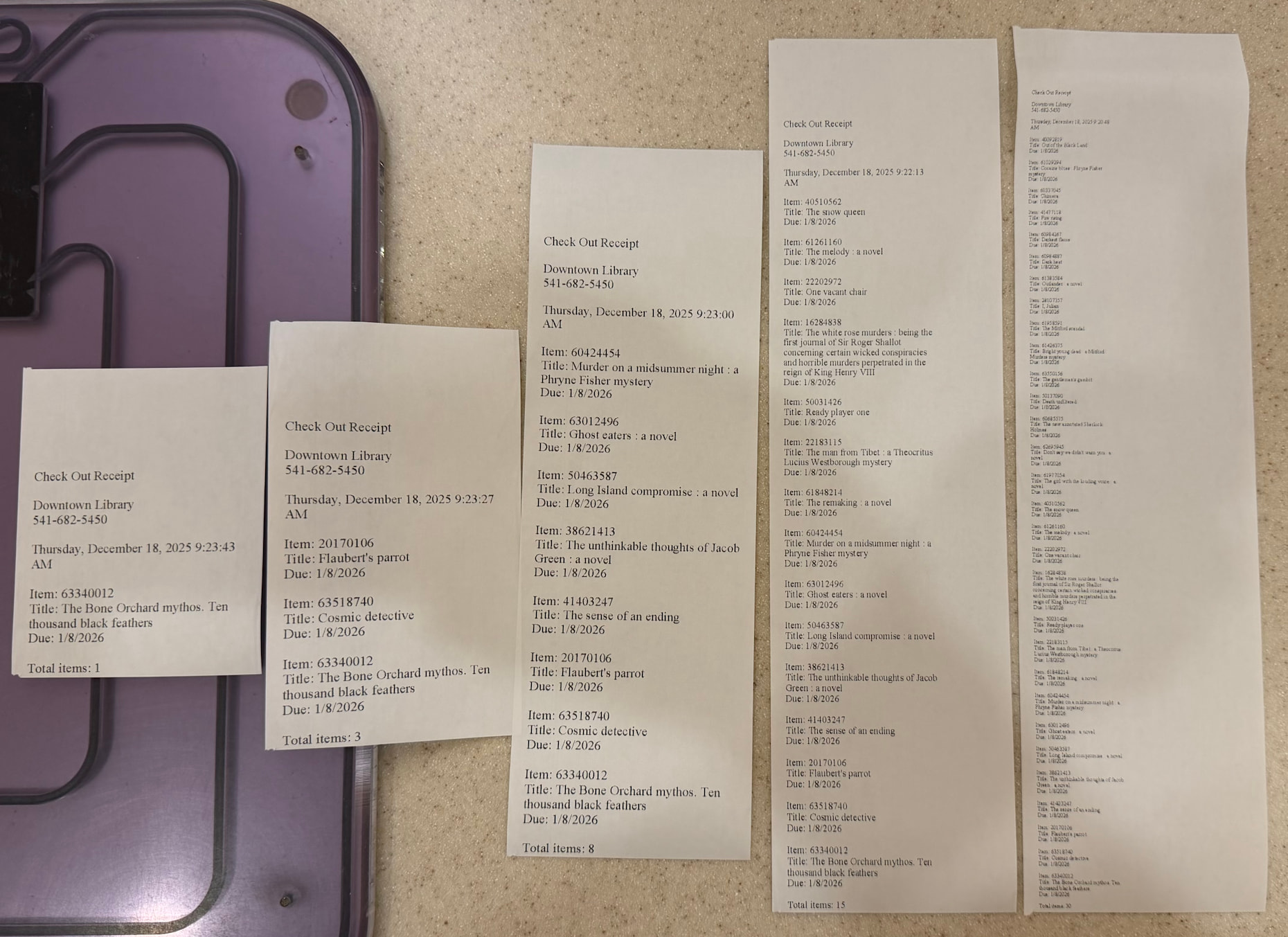
Had a complaint from a patron passed to us through a front desk worked that the receipt they got from the ExpressCheck was unreadable. Got a look at it and indeed each block of text from each item was about the size of my little fingernail with unreadable 2pt text. Tested myself and got the same thing. It basically scaled down with the number of items.
Ended up posting for help in QZ Tray’s subreddit, and got their answer almost immediately. In printing preferences of our TM-T88Vs you can go into Advanced and find the paper size. It was set to 80mm x 297mm, so it was reducing everything to fit into about an 11” receipt. There’s an option for 80mm x 3276mm, which is like 10’ so it shouldn’t shrink things any more.
Interestingly this was all back in maybe October, November of 2025. Recently I got a follow-up on Reddit from the QZ folks (their support is great) and they were asking about it. I took a machine on the test bench and tried to get a messed up receipt so I could send them a pic of what it was doing, and that time I tried it the receipts were normal, even with the smaller paper setting. Not sure if someone fixed something internally or what.
Whatever the case, if you end up running into this weirdness, that’s what we did to fix it.
Thanks so much for sharing your experience and this information!
Also, a great example of why it is helpful for Polaris to be using good “off the shelf” components rather than attempting to build something from scratch. I too have found the folks from QZ to be very responsive.