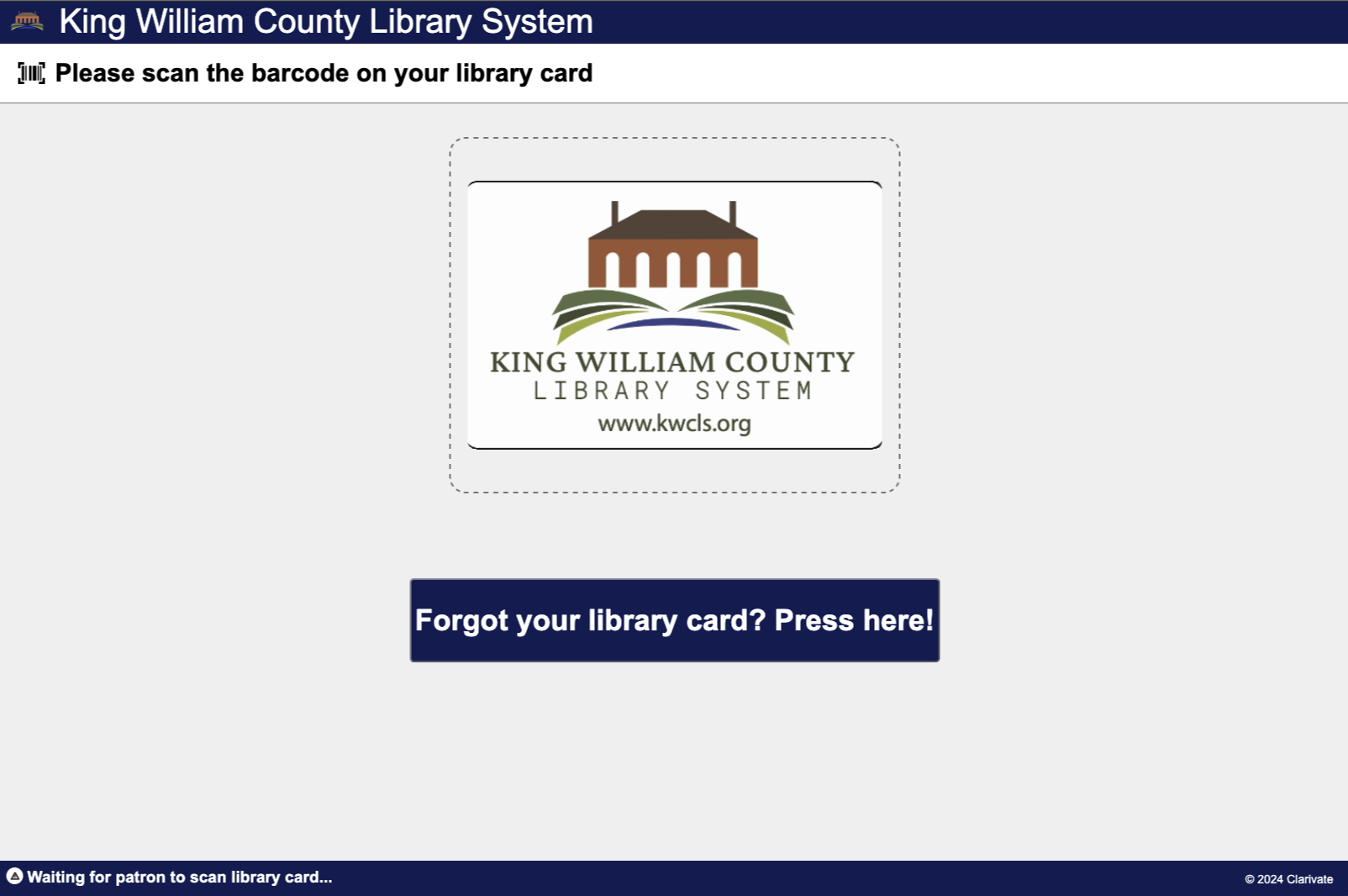
Thanks to the new browser-based ExpressCheck, you have some customization options to play with that’ll make your self-check machine look like something that belongs in your library. Depending on how far you want to take things, you can make some simple changes in the WebAdmin’s language editor, or you can dive in and do all sorts of things with code and software.
For this library, I wanted to set up a self-check system with their library name, logo, and library card image. The default library card image is an animated gif of a card that crossfades between the front and back of the card in a ten second loop. I wanted to do something similar, but use the library’s logo and a card back that was a bit customized to display relevant information and a couple of Easter eggs. (Because I try and have some fun with my job and I occasionally get a smile out of a patron.)
ExpressCheck Themes
The first thing I did was hop into the server and open up the ExpressCheck directory. You’ll find this at:
C:\Program Files\Polaris\{VERSION}\ExpressCheck\
So if you’re running Polaris 7.7, that directory will be:
C:\Program Files\Polaris\7.7\ExpressCheck\
The ExpressCheck allows for theming that’s similar to what you can do with the PowerPAC. Unlike the PowerPAC, you won’t have to compile your SCSS or anything like that. ExpressCheck uses a simplified theming system. You’ll find your theme folders in:
C:\Program Files\Polaris\{VERSION}\ExpressCheck\assets\themes\
I created a new folder called kwcls and copied and pasted into it the contents of the polaris folder. So basically, my new kwcls theme folder is just a copy of the default polaris theme folder. But with that in place, I can start making modifications.
The first thing I wanted to change is the default library card animation, a file called library-card.gif. Pulling that gif into an image editor, I found that the gif is 470 x 304 pixels in size. I created a new image with those dimensions, dropped in an image of the front of the library card, fixed the positioning, and exported that as front.png.
For the back of the card, I imported an image of the back of the library card, but I removed boilerplate borrower’s agreement and replaced it with the library’s information, branch name, URL, changed the barcode number, and threw in a signature to make it look a bit nicer. A little clean up and then I exported that as back.png.
I searched the web for a good ten minutes, looking for a decent animated gif maker and decided against all of them because ffmpeg exists. If you’re not familiar, ffmpeg is a free and open source terminal app that does almost anything you might want to do with video. I use ffmpeg to create a YouTube video of a podcast I’m on. I tell it to combine the logo of the podcast with the audio and generate a waveform in the centre of the video. That way we’ve got a video that actually has movement in it, and the waveform looks pretty cool.
As things go, you can tell ffmpeg to make an animated gif, ten seconds long, based on two given images, and to crossfade between the images after displaying each one for four seconds. The command to do this, like most ffmpeg commands, is horrendous. If ever there was a good use for AI, it’s asking an LLM how to do something in ffmpeg. But once you discover how the deep magic works, you too can create your own illusions, or at least create your own animated library card.
ffmpeg -y -loop 1 -t 5 -i front.png -loop 1 -t 5 -i back.png \
-filter_complex "\
[0:v]format=rgba,fade=t=out:st=4:d=1:alpha=1[fade1]; \
[1:v]format=rgba,fade=t=in:st=0:d=1:alpha=1[fade2]; \
[fade1][fade2]overlay[ol1]; \
[1:v]format=rgba,fade=t=out:st=4:d=1:alpha=1[fade3]; \
[0:v]format=rgba,fade=t=in:st=0:d=1:alpha=1[fade4]; \
[fade3][fade4]overlay[ol2]; \
[ol1][ol2]concat=n=2:v=1:a=0,split[gif][palette]; \
[palette]palettegen[pal]; \
[gif][pal]paletteuse" \
-loop 0 library-card.gif
I took my new library-card.gif and copied it to the server. After I deleted the default gif, I dropped mine into the theme’s folder.

Now, none of this does you any good unless you add the new ExpressCheck theme to Polaris. To do that, open up SA and navigate to Administration → Explorer → System. From there, expand the system level, and expand the Database Tables. Within Database Tables you’ll see ExpressCheck themes. You can add your new theme here. For the path, all you need is the folder’s name so long as that folder is in:
C:\Program Files\Polaris\{VERSION}\ExpressCheck\assets\themes\
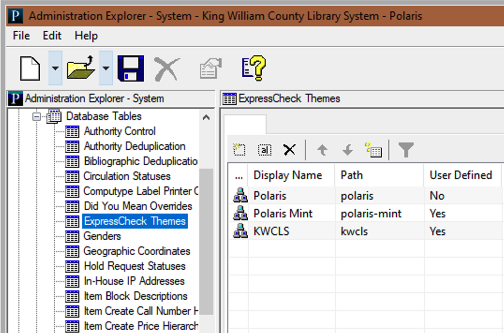
Since my folder name is kwcls, that’s what I added. Click save and then expand the branch. Go to Parameters → SelfCheck Unit and the first option there allows you to pick your theme. You can assign themes at the branch level. You may notice that the branch name is on that animated library card. I’ll be creating another theme that is exactly the same as my kwcls theme, and the only difference will be the library-card.gif will have the other branch’s name on it. I can add that, and then assign that theme to the other branch.
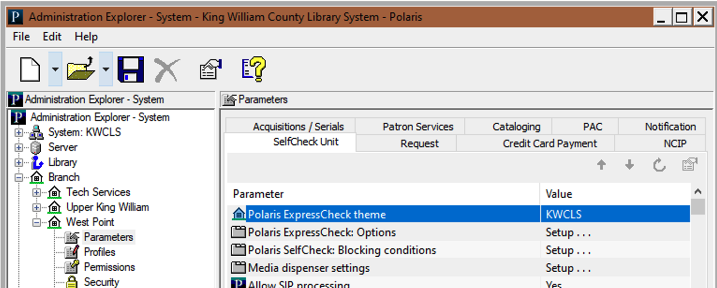
Save your changes. The new theme is picked up right away by ExpressCheck. After looking over the changes, I noticed that the Polaris logo was still in the upper left corner next to the library’s name. Turns out, that logo is part of your theme directory and it’s a 70 x 70 pixel PNG called logo_circle.png. I created a new 70 x 70 png with the library’s logo and overwrote the one in my theme’s folder. Reload the ExpressCheck page in the browser the library’s logo has taken Polaris’ place.
WebAdmin and Language Customization
After that, I wanted to change the ExpressCheck header to display the library’s name instead of Polaris ExpressCheck. Don’t get me wrong, I love the new ExpressCheck, but patrons don’t know or care what a “Polaris ExpressCheck” is. You’ll change this header in WebAdmin, through the language editor. Log into WebAdmin and select ExpressCheck. You’re going to edit StringID EC_TEXT_HEADER_TITLE_SHORT and change that to whatever you’d like to have at the top. I used King William County Library System. Since I was there, I also wanted to update a couple of other language strings to use the word PIN instead of Password. KWCLS uses numerical PINs, so to say “password” on-screen might be a bit confusing. I edited EC_TEXT_PWD_INSTRUCTION and EC_TEXT_PWD_INSTRUCTION_OK and literally replaced the word “password” with “PIN.”
Changes in the WebAdmin’s language editor are fairly instantaneous. If you happen to be logged into the ExpressCheck, you can refresh your browser and see your updates.
And with that, I had a better looking, customized self-check that promotes the library more than it promotes Polaris.