# Repost regarding potential browser changes that would affect QZ tray (and any similar product)
**URL:** https://forum.innovativeusers.org/t/repost-regarding-potential-browser-changes-that-would-affect-qz-tray-and-any-similar-product/2688
**Category:** Polaris
**Created:** [November 5, 2025, 5:27pm UTC](https://forum.innovativeusers.org/t/repost-regarding-potential-browser-changes-that-would-affect-qz-tray-and-any-similar-product/2688 "2025-11-05T17:27:14Z")
**Posts on this page:** 2
**Page:** 1
### Author:  [@wesochuck](https://forum.innovativeusers.org/u/wesochuck)
#### Post date: [November 5, 2025, 5:27pm UTC](https://forum.innovativeusers.org/t/repost-regarding-potential-browser-changes-that-would-affect-qz-tray-and-any-similar-product/2688/1 "2025-11-05T17:27:14Z")
This is a repost from the QZ tray folks regarding a potential upcoming change that would affect QZ tray **or any similar product**. QZ tray is the new no-popup required, printing helper application that was released for ExpressCheck Web in version 7.7 and for Leap in version 7.8.
This _might include an impact on the Leap Security helper application used for RFID tags_.
* * *
The **WICG (Web Incubator Community Group)** has decided to impose additional restrictions on communications between web browsers and **local applications** (such as QZ Tray) to counter malicious activity.
This change, called **“Local Network Access” (LNA)**, **WILL** impact all clients running QZ Tray once it is rolled out.
While the WICG has acknowledged our need to **whitelist** this connection attempt, the rollout is proceeding **much faster** than we anticipated. This aggressive timeline prevents projects like QZ Tray from implementing **better messaging, improved whitelisting, and reliable detection mechanisms** , ultimately harming honest software companies (like us) who are trying to comply with these new rules.
#### Key Impacts & Concerns:
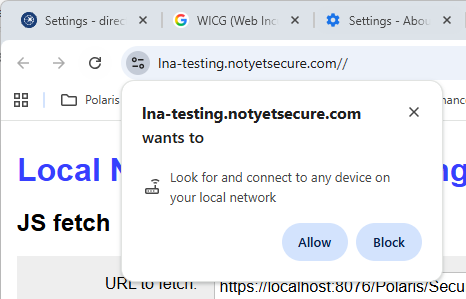
- **Pop-up Warnings:** All users will soon see a [confusing pop-up warning](https://github.com/WICG/local-network-access/issues?q=author%3Atresf "https://github.com/WICG/local-network-access/issues?q=author%3Atresf") (e.g., `"``example.com`` wants to Look for and connect to any device on your local network"`) upon initial connection, which may prompt them to click **BLOCK** despite QZ Tray _only_ connecting to itself on `wss://localhost:8181`.
- **Fast Rollout:** The WICG’s implementation timeline is too aggressive, happening faster than QZ Tray can implement necessary solutions like **better client-side messaging** and graceful error handling.
- **Lack of Control:** The WICG has provided **no mechanism for fine-grained control at the application level** , meaning QZ Tray cannot set up whitelisting preferences in advance for users; though Chrome offers some flag/enterprise policy options they’re either too broad to be secure, or too specific to be suitable for us.
- **No Detection:** There is [no official timeline for the promised **client-side detection**](https://github.com/WICG/local-network-access/issues/44 "https://github.com/WICG/local-network-access/issues/44") of this pop-up, leaving QZ Tray unable to gracefully handle the change before the browser rollout occurs.
#### What can be done:
- Power-users, developers and System Administrators can [share their concerns directly with the WICG on the LNA issue tracker (github)](https://github.com/WICG/local-network-access "https://github.com/WICG/local-network-access").
- Enterprise Chrome environments can get ahead of this rollout by temporarily [disabling the LNA pop-ups](https://developer.chrome.com/blog/local-network-access "https://developer.chrome.com/blog/local-network-access") or via [enterprise whitelisting](https://chromeenterprise.google/policies/#LocalNetworkAccessAllowedForUrls "https://chromeenterprise.google/policies/#LocalNetworkAccessAllowedForUrls").
- Firefox users can read-up about [their implementation here](https://support.mozilla.org/en-US/kb/control-personal-device-local-network-permissions-firefox "https://support.mozilla.org/en-US/kb/control-personal-device-local-network-permissions-firefox") however enterprise policies seem to be [waiting on Chrome first](https://github.com/mozilla/policy-templates/issues/1259 "https://github.com/mozilla/policy-templates/issues/1259").
- Become familiar with this new pop-up by testing beta versions of your web browser.
---
### Author:  [@wesochuck](https://forum.innovativeusers.org/u/wesochuck)
#### Post date: [November 6, 2025, 1:38pm UTC](https://forum.innovativeusers.org/t/repost-regarding-potential-browser-changes-that-would-affect-qz-tray-and-any-similar-product/2688/2 "2025-11-06T13:38:46Z")
It is confirmed that this is rolling out with Chrome 142 and does affect both QZ Tray and the Security Manager.
To be clear, there is **nothing** else Innovative or QZ Tray can do with their software products to get around this, it is totally a browser enforced thing.
This is the pop-up folks will see:
You can control the default behavior in settings:
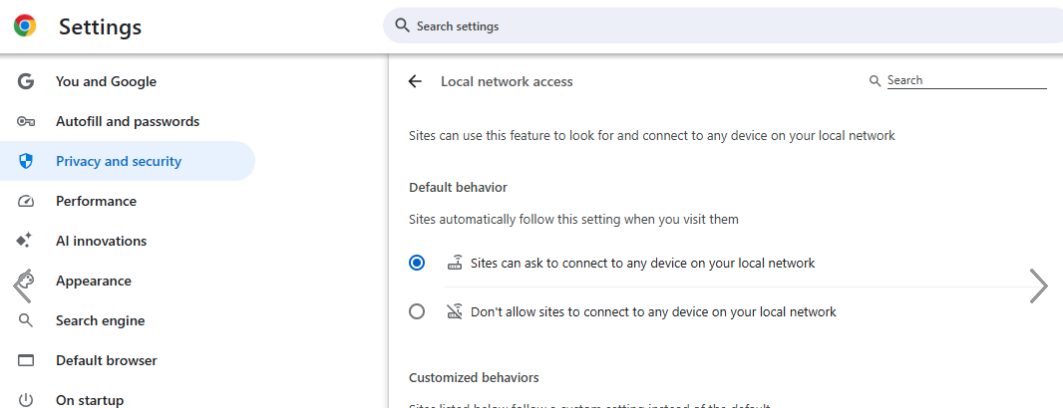
These adjustments would need to be made in each Chrome profile.
And [those who are controlling Chrome at an Enterprise level also have additional options](https://docs.google.com/document/d/1QQkqehw8umtAgz5z0um7THx-aoU251p705FbIQjDuGs/edit?tab=t.0#heading=h.36g051otlah9).